


I have been doing a lot of post production work in Adobe Photoshop with my Wacom tablet recently. A couple of things I came across that I thought might be useful to share.
 1. Ring when tapping in Photoshop with a tablet.
This can become very annoying. I believe it comes as default in Windows 7. This is how I got rid of the problem in Windows 7 x64 bit.
1. Ring when tapping in Photoshop with a tablet.
This can become very annoying. I believe it comes as default in Windows 7. This is how I got rid of the problem in Windows 7 x64 bit.
-In the Control Panel search for Edit group policy. -In here you need to go to administrative templates, windows components, tablet pc, cursors, turn off pen feedback.
-In this window change from not configured to enabled.
-Click OK and your done.
Update: There is a lot more information on this subject here.
-In here you need to go to administrative templates, windows components, tablet pc, cursors, turn off pen feedback.
-In this window change from not configured to enabled.
-Click OK and your done.
Update: There is a lot more information on this subject here.
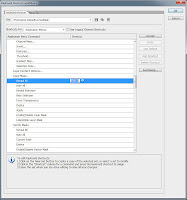 2. Add a Layer mask shortcut.
I am constantly using layer masks and do get feed up of going all the way to the bottom of the Layers pallete to click the button. In Photoshop there is no default shortcut. To add a shortcut click Edit, Keyboard Shortcuts, under Layer Mask> add a shortcut key (I used Ctrl+Q) to Reveal All.
2. Add a Layer mask shortcut.
I am constantly using layer masks and do get feed up of going all the way to the bottom of the Layers pallete to click the button. In Photoshop there is no default shortcut. To add a shortcut click Edit, Keyboard Shortcuts, under Layer Mask> add a shortcut key (I used Ctrl+Q) to Reveal All.
